If you work with Odoo and want to understand how the framework actually processes a request, the MVC architecture is the right place to start. Odoo follows a Model-View-Controller pattern, but it applies that pattern in a specific way that differs from a textbook definition. This post breaks down each layer, shows how they connect, and explains what that means for your day-to-day development work.
What Is MVC Architecture in Odoo
MVC stands for Model, View, and Controller. At its core, it is a design pattern that separates an application into three distinct responsibilities. The Model handles data and business logic. The View handles what the user sees. The Controller handles the communication between the two.
Odoo uses this pattern throughout its entire framework. Every module you build or extend in Odoo will touch all three layers. Understanding which layer owns which responsibility saves you time when debugging, extending, or building features.
The Three Layers of Odoo MVC
The Model Layer
In Odoo, models are Python classes that inherit from models.Model. Each class maps directly to a database table. When you define fields, add constraints, or write methods that modify records, you are working in the Model layer.
The ORM (Object-Relational Mapping) layer sits inside the Model. It translates your Python code into SQL queries without requiring you to write SQL directly. You define what the data looks like and how it behaves, and the ORM handles the rest.
Here is a simple example:
from odoo import models, fields

class SaleOrder(models.Model):
    _name = 'sale.order'
    _description = 'Sales Order'

    name = fields.Char(string='Order Reference', required=True)
    partner_id = fields.Many2one('res.partner', string='Customer')
    amount_total = fields.Float(string='Total Amount')
This class defines a model called sale.order. Odoo registers it as a database table automatically. The fields become columns. The class becomes the central place for all business logic tied to this data.
Business logic in Odoo models includes computed fields, onchange methods, constraints, and CRUD overrides. If a rule governs data, it belongs in the Model.
The View Layer
Views in Odoo are XML records stored in the database. They define how your model data appears in the user interface. Odoo supports several view types out of the box.
The most common ones are:
- Form view for creating and editing individual records
- List view (also called tree view) for displaying multiple records in a table
- Kanban view for card-based layouts often used in pipelines
- Search view for controlling filters, group-by options, and search behavior
- Graph view and pivot view for reporting and data analysis
A basic form view for the sale.order model looks like this:
<record id="view_sale_order_form" model="ir.ui.view">
    <field name="name">sale.order.form</field>
    <field name="model">sale.order</field>
    <field name="arch" type="xml">
        <form string="Sales Order">
            <sheet>
                <group>
                    <field name="name"/>
                    <field name="partner_id"/>
                    <field name="amount_total"/>
                </group>
            </sheet>
        </form>
    </field>
</record>
Views do not contain business logic. They tell Odoo how to render data, not how to process it. Separating presentation from logic is one of the main benefits of MVC, and Odoo enforces this cleanly through XML views versus Python models.
On the frontend, Odoo uses a JavaScript framework called OWL (Odoo Web Library). OWL is a component-based system that renders views in the browser. When a user interacts with a form, OWL communicates with the backend through the Controller layer.
The Controller Layer
The Controller sits between the Model and the View. In Odoo, this role is handled in two places: the server-side controllers and the client-side web client logic.
On the server side, Odoo uses Python controllers for HTTP routes. These are classes that inherit from http.Controller. They receive HTTP requests, call the right model methods, and return responses. This is most relevant when building custom web pages, REST endpoints, or portal routes.
from odoo import http
from odoo.http import request

class SalePortalController(http.Controller):

    @http.route('/my/orders', type='http', auth='user', website=True)
    def my_orders(self):
        orders = request.env['sale.order'].search([
            ('partner_id', '=', request.env.user.partner_id.id)
        ])
        return request.render('sale.portal_my_orders', {'orders': orders})
This controller handles a GET request to /my/orders, queries the model, and passes the result to a template for rendering.
For standard Odoo backend views (form, list, kanban), the OWL-based web client acts as the controller on the frontend. It listens to user events, calls RPC methods on the server, and updates the view based on the response.
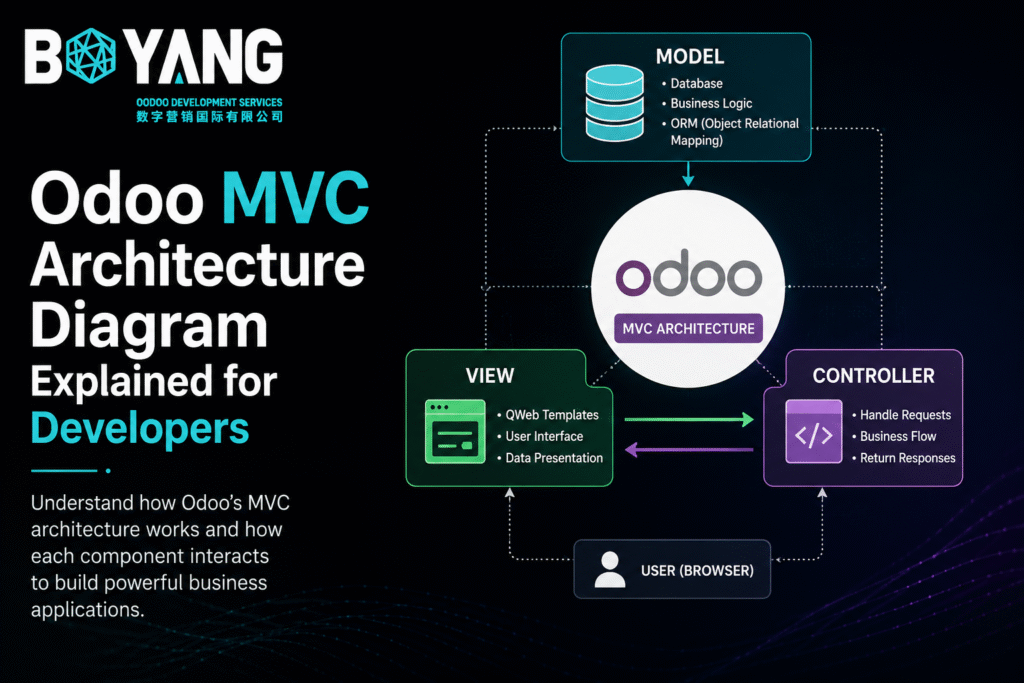
The Odoo MVC Architecture Diagram
Here is a simplified flow of how a typical user action moves through the Odoo MVC layers:
User Action (click, form submit, navigation)
        |
        v
   OWL Frontend (View + Client Controller)
        |
   JSON-RPC / HTTP Request
        |
        v
   Python Controller (http.Controller)
        |
        v
   Odoo ORM (Model Layer)
        |
        v
   PostgreSQL Database
        |
        v
   Response flows back up through the same path
        |
        v
   OWL updates the View in the browser
Every user interaction follows this path. The View captures the event. The Controller processes the request. The Model reads or writes data. The result returns to the View.
How Odoo Extends the Classic MVC Pattern
Classic MVC treats the three layers as fully independent. Odoo adjusts this in a few ways that developers need to understand.
First, Odoo views are not static files. They are records stored in the ir.ui.view table. When Odoo loads a view, it reads the XML from the database at runtime. This makes views dynamic and extendable through inheritance, which is one of Odoo’s most powerful features.
Second, Odoo’s ORM does more than map objects to tables. It handles access rights, multi-company rules, computed fields, and stored versus non-stored field logic all within the Model layer. This means the Model is heavier in Odoo than in a typical MVC setup.
Third, the Controller layer in Odoo is optional for most backend development. When you build standard views and models, Odoo’s generic controllers handle the communication automatically. You only write custom controllers when you need custom routes, REST APIs, or website pages.
View Inheritance in the MVC Pattern
One of the most developer-friendly aspects of Odoo’s MVC implementation is view inheritance. Instead of rewriting an entire view, you extend it using XPath or field selectors.
<record id="view_sale_order_form_inherit" model="ir.ui.view">
    <field name="name">sale.order.form.inherit.custom</field>
    <field name="model">sale.order</field>
    <field name="inherit_id" ref="sale.view_sale_order_form"/>
    <field name="arch" type="xml">
        <xpath expr="//field[@name='partner_id']" position="after">
            <field name="x_custom_field"/>
        </xpath>
    </field>
</record>
This adds a custom field after partner_id in the existing sales order form. The base view stays untouched. Your module adds to it. When your module is uninstalled, the change disappears automatically.
This pattern keeps the View layer modular and avoids conflicts between modules in the same Odoo instance.
Model Inheritance in Odoo
Odoo supports three types of model inheritance, each with a different purpose in the MVC architecture.
Classical inheritance (_inherit with no _name) extends an existing model in place. New fields and methods merge into the original model.
Prototype inheritance (_inherit with a new _name) creates a new model that copies the structure of the parent but lives in a separate table.
Delegation inheritance (_inherits) links two tables so one model delegates field access to another through a foreign key.
For most customizations, classical inheritance is the right choice. It keeps the MVC structure intact by adding logic to the Model layer without changing the Controller or View unnecessarily.
The Role of OWL in the View Layer
OWL replaced the older Odoo Widget system starting in Odoo 14. It uses a component-based approach similar to React or Vue, but built specifically for Odoo’s needs.
In the MVC context, OWL components sit in the View layer. They render data from the server, handle user interactions locally, and communicate state changes back to the server via RPC calls.
A basic OWL component looks like this:
import { Component, useState } from "@odoo/owl";

class MyWidget extends Component {
    setup() {
        this.state = useState({ count: 0 });
    }

    increment() {
        this.state.count++;
    }
}

MyWidget.template = "my_module.MyWidgetTemplate";
The template lives in an XML file and handles the visual output. The component class handles state and events. Together, they form the frontend View and lightweight Controller role within the browser.
Common Mistakes Developers Make in Odoo MVC
Putting business logic in views. XML views handle layout. The moment you need a calculation, validation, or conditional rule based on data, that logic belongs in the Model as a computed field, constraint, or onchange method.
Writing SQL in controllers. The ORM exists for a reason. Raw SQL bypasses access rights, multi-company filters, and audit trails. Use env['model.name'].search() and related ORM methods instead.
Overusing custom controllers. Developers coming from other frameworks sometimes write HTTP controllers for everything. For standard backend modules, Odoo’s generic JSON-RPC layer handles model access automatically. Save custom controllers for website pages, portal routes, and external API endpoints.
Ignoring view inheritance. Overwriting an entire base view instead of inheriting it causes upgrade conflicts. Always use inherit_id to extend existing views.
MVC in Multi-Company and Multi-Language Odoo
Odoo’s MVC architecture handles multi-company and multi-language requirements at the Model layer, not the View or Controller layer. This is an important design decision.
Record rules (ir.rule) filter data based on the current company at the ORM level. This means the View never needs to know about company boundaries. It simply receives data that already respects those rules.
Translations work through the ir.translation model (in older versions) or the _ function in newer versions. The View renders a string, and the Model layer resolves the correct translation before sending it to the browser. Developers do not need to build translation logic into controllers or views.
Testing Each MVC Layer in Odoo
Testing in Odoo typically targets the Model layer. Unit tests use self.env to call model methods, create records, and assert expected outcomes. Odoo provides a TransactionCase base class for this purpose.
from odoo.tests.common import TransactionCase

class TestSaleOrder(TransactionCase):
    def test_order_creation(self):
        order = self.env['sale.order'].create({
            'name': 'SO-TEST-001',
            'partner_id': self.env['res.partner'].search([], limit=1).id,
        })
        self.assertEqual(order.name, 'SO-TEST-001')
View testing is less common because views are XML and Odoo renders them server-side. For frontend behavior, Odoo provides a QUnit-based testing framework, though most teams focus their testing effort on the Model layer where business logic lives.
Controller testing involves making HTTP calls using the test client provided in odoo.tests.common.HttpCase. This is useful for validating portal routes, website pages, and custom API endpoints.
Why the Odoo MVC Pattern Matters for Module Development
When you understand MVC in Odoo, structuring your modules becomes straightforward. You know where data logic lives. You know where presentation lives. You know when a controller is necessary and when it is not.
A well-structured Odoo module follows this layout:
models/contains Python files defining your models and business logicviews/contains XML files defining your forms, lists, and menuscontrollers/contains Python files for any custom HTTP routesstatic/src/contains OWL components and assets for frontend behavior
This folder structure reflects the MVC layers directly. Reading someone else’s module becomes easier when both you and they follow this separation consistently.
Summary
Odoo MVC architecture assigns specific responsibilities to each layer. Models own data structure, database interaction, and business rules. Views own layout, rendering, and user interface structure. Controllers handle HTTP communication for custom routes and the OWL framework handles frontend interaction for standard views.
Odoo extends the classic MVC pattern with a dynamic XML view system, a feature-rich ORM, and a component-based frontend library. Learning where each concern belongs in this architecture makes you a faster and more effective Odoo developer.