Implementing an ERP system can completely transform how your business operates, but only if it’s done right. Many companies invest in ERP software expecting smoother workflows and better visibility, yet nearly half of implementations fail due to poor planning and lack of structure.
To avoid costly mistakes, you need a well-thought-out roadmap. This guide provides a comprehensive ERP implementation checklist that helps your business go live successfully, on time, and within budget. Whether you’re implementing Odoo ERP in Malaysia or upgrading from an older system, these steps will keep your project on track.
Why a Structured ERP Implementation Plan Matters?
ERP implementation isn’t just about installing software. It’s a full-scale business transformation involving data, people, and processes. Without a proper plan, the project can lead to delays, data errors, and poor adoption rates.
A successful ERP implementation ensures:
-
Seamless business operations from Day 1.
-
Accurate, clean, and connected data across all departments.
-
Trained employees who know how to use the system effectively.
-
Long-term scalability and integration with other digital tools.
By following a clear checklist, you can minimize risks and guarantee your ERP system delivers real business value.
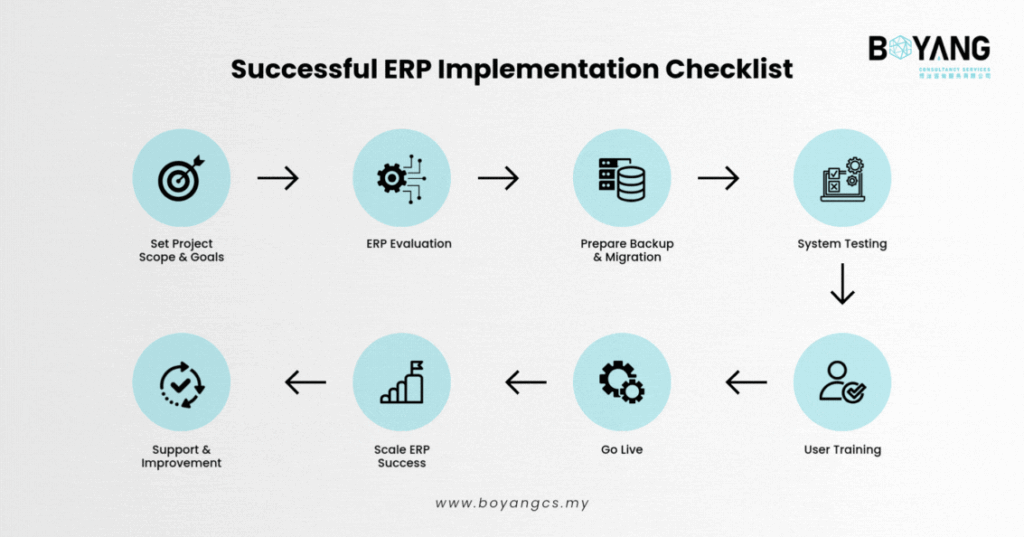
The 8 Essential Steps for a Successful ERP Implementation
1. Set Clear Business Goals
Before you even start selecting an ERP system, identify what you want to achieve. Ask yourself:
-
Are you trying to reduce manual data entry?
-
Do you want real-time visibility of sales and inventory?
-
Are you preparing for Malaysia’s e-Invoicing compliance?
Setting specific, measurable, attainable, relevant, and time-bound (SMART) goals helps your project team stay focused.
At this stage, it’s crucial to involve key decision-makers from all departments. Their input ensures that the new system reflects your company’s real operational needs. Once goals are defined, set a realistic timeline and budget to keep your ERP project aligned.
2. Choose the Right ERP System
Not all ERP systems fit every business. A manufacturing company has very different needs compared to a trading or retail business. The right system should support your current processes and scale with future growth.
When evaluating ERP solutions, consider:
-
Scalability: Can it grow as your business expands?
-
Localization: Does it meet Malaysia’s tax and accounting standards?
-
Integration: Can it connect with e-commerce, POS, or CRM systems?
-
User experience: Is it simple enough for your team to adopt quickly?
Odoo ERP is a strong choice for Malaysian SMEs because it’s flexible, modular, and compliant with local requirements such as Odoo MY Localization and Odoo MY e-Invoicing.
3. Create a Data Migration Plan
Data migration is one of the most critical parts of ERP implementation. Bringing over inaccurate or outdated data can cause major disruptions.
Start by cleaning your existing data — remove duplicates, fix errors, and organize records logically. Then, create a data mapping plan to determine how information will move from your old system to your new ERP.
A proper migration plan should include:
-
Data cleaning and preparation.
-
Validation rules to ensure accuracy.
-
Backups before transferring data.
-
Testing after migration to confirm everything imported correctly.
With clean, reliable data, your ERP system will perform efficiently from day one.
4. Test the System Before Deployment
Never skip the testing phase. Thorough testing ensures your ERP system works as intended and avoids costly issues after go-live.
Conduct different levels of testing, including:
-
Unit testing – To check individual modules.
-
Integration testing – To ensure different modules communicate properly.
-
User acceptance testing (UAT) – To confirm the system meets end-user needs.
Testing should involve both technical staff and actual users. Their feedback helps detect missing features, bugs, or workflow gaps early — long before the system goes live.
5. Train End Users Effectively
A powerful ERP system is useless if your team doesn’t know how to use it. User training ensures everyone is confident in handling the new tools.
Design a training program tailored to each department. For example, finance teams can focus on invoicing and reporting modules, while warehouse staff can practice inventory and stock control.
Hands-on training sessions, documentation, and ongoing Q&A support are essential for building user confidence and minimizing downtime after launch.
6. Go Live with Confidence
The go-live phase is exciting but can also be nerve-wracking. The key is preparation. Before launch day:
-
Inform all employees about the schedule and possible disruptions.
-
Make sure backup systems are ready.
-
Consider rolling out the system in phases instead of all at once.
Monitor performance closely during the first few days. If issues arise, address them immediately to prevent workflow interruptions.
With a phased rollout and proper testing, your business can experience a smooth transition with minimal downtime.
7. Measure the Success of Your ERP Implementation
How do you know if your ERP implementation was successful? Measure your results.
Track key performance indicators (KPIs) such as:
-
User adoption rate: Are employees using the system effectively?
-
Process efficiency: Has productivity improved?
-
Data accuracy: Is information more reliable now?
-
Return on investment (ROI): Are you getting measurable value?
-
Customer satisfaction: Are clients benefiting from faster and more accurate operations?
Evaluating these KPIs helps identify areas for improvement and ensures your ERP continues to evolve with your business goals.
8. Ensure Ongoing Support and Continuous Improvement
ERP implementation doesn’t end at go-live. As your business grows, your system needs updates, new modules, and continuous optimization.
Having a reliable ERP support partner ensures your system runs smoothly long-term. They can fix technical issues, apply updates, and guide you through future upgrades.
At Onnet Consulting, we provide ongoing Odoo ERP support in Malaysia, ensuring your system stays secure, compliant, and optimized. Our dedicated support team assists you with troubleshooting, customization, and training whenever you need it.
Common Reasons ERP Implementations Fail
Even with the best tools, ERP projects can fail due to:
-
Lack of executive involvement.
-
Poor data migration.
-
Inadequate user training.
-
Unrealistic timelines.
-
No post-launch support.
By following this checklist, your company can avoid these pitfalls and achieve a successful ERP implementation that improves efficiency, saves time, and drives long-term growth.
How Onnet Consulting Ensures ERP Success?
As a leading Odoo Partner in Malaysia, Onnet Consulting has implemented ERP systems for businesses across industries — from manufacturing and retail to trading and distribution.
Our ERP implementation process includes:
-
Business needs assessment.
-
Odoo module selection and configuration.
-
Data migration and system testing.
-
User training and go-live support.
-
Continuous optimization and technical assistance.
We ensure every project is customized to match your operational workflows, helping your business get the most out of Odoo ERP from day one.
Wrap-up
Implementing an ERP system is one of the most significant steps in digital transformation. It can streamline your business operations, improve collaboration, and provide better control over every process, but only if it’s implemented strategically.
Use this ERP implementation checklist as your guide, and work with experienced ERP professionals who understand your local business environment.
If you’re ready to start your ERP journey, Boyang Malaysia is here to help you plan, implement, and optimize your Odoo ERP system for lasting success. Contact us today to schedule a free consultation or Odoo & Sage ERP demo and learn how your business can achieve a smooth, successful ERP implementation.